

📢 Disclosure: This post contains affiliate links. We may earn a commission at no extra cost to you. We only recommend products we genuinely believe in.
Opening a bank account online has never been easier — most major banks and online-only institutions allow you to complete the entire process in 10 to 15 minutes from your phone or computer, with no branch visit required. Whether you’re opening your very first bank account or switching to a better one, this step-by-step guide covers everything you need to know.
Choosing the right bank account is also closely connected to maximizing your savings — once your account is open, understanding what is APY will help you make sure your money is earning as much interest as possible.
What You Need to Open a Bank Account Online
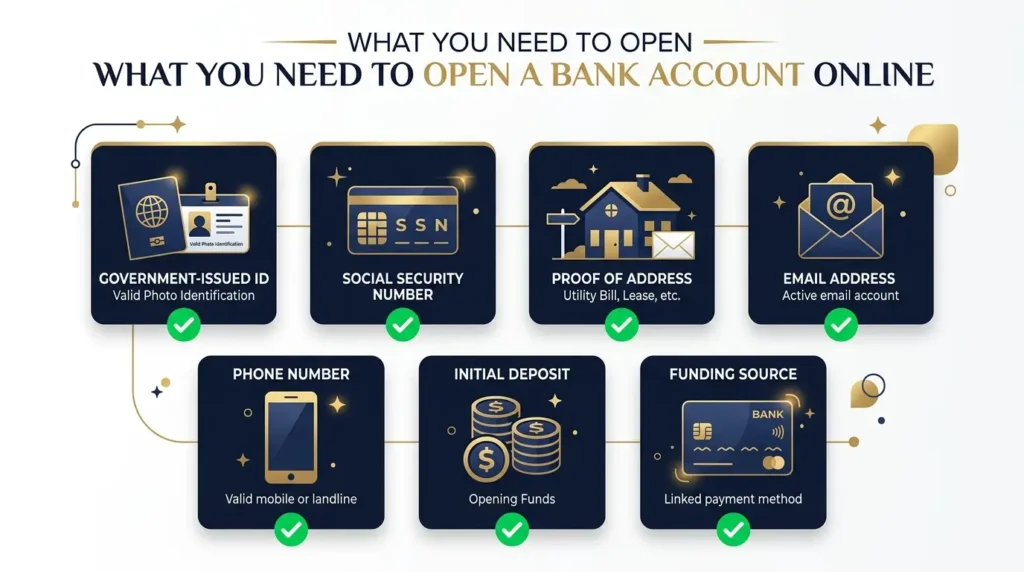
Before you start the application, gather these items. Having everything ready will make the process take under 15 minutes:
- Government-issued photo ID: Driver’s license, state ID, or passport
- Social Security Number (SSN) or Individual Taxpayer Identification Number (ITIN)
- Personal information: Full legal name, date of birth, current address
- Email address for account confirmation and communication
- Phone number for identity verification (SMS code)
- Initial deposit: Many online banks have $0 minimum — but some require $25 to $100 to open
- Funding source: Debit card or routing/account number from an existing bank account to fund the new account
Note: If you don’t have an SSN (for example, recent immigrants), some banks accept an ITIN or passport plus visa. Credit unions and community banks are often more flexible with documentation requirements.
How to Open a Bank Account Online: Step by Step
Step 1: Choose the Right Bank and Account Type
Before applying, decide what type of account you need and which bank is the best fit. The two main account types are:
- Checking account: For everyday spending — paying bills, using a debit card, receiving direct deposit. Usually earns little to no interest.
- Savings account: For storing money you don’t need immediately. Earns interest (APY). Some restrictions on monthly withdrawals.
Most people open both — a checking account for daily transactions and a savings account for building an emergency fund or saving toward goals. Read our guide on checking vs savings accounts to understand the key differences before deciding.
Step 2: Compare Banks Before Applying
Not all banks are equal. Key factors to compare:
| Factor | What to Look For |
|---|---|
| Monthly fees | $0 (avoid accounts with unavoidable monthly fees) |
| Minimum balance | $0 minimum to open and maintain |
| APY on savings | 4.00%+ for high-yield savings in 2026 |
| ATM network | Large fee-free ATM network or ATM fee reimbursement |
| FDIC insured | Must be FDIC insured (up to $250,000) |
| Mobile app | Strong ratings (4+ stars) on App Store and Google Play |
| Customer service | 24/7 availability by phone or chat |
Top online banks in 2026 worth considering:
- SoFi Bank — High-yield checking + savings combo, no fees, 0.50% APY on checking with direct deposit
- Ally Bank — No monthly fees, competitive savings APY, excellent customer service
- Marcus by Goldman Sachs — Top-tier savings APY, no fees, simple interface
- Chime — No monthly fees, no minimum balance, early direct deposit. Good for those new to banking.
- Capital One 360 — Excellent mobile app, no fees, both checking and savings with competitive APY
Step 3: Go to the Bank’s Official Website or App
Always navigate directly to the bank’s official website — type the URL directly into your browser or download the official app from the App Store or Google Play. Never open a bank account through a link in an email or text message, as these are common phishing tactics.
Look for the “Open an Account” or “Get Started” button on the homepage. Most banks make this very prominent.
Step 4: Fill Out the Online Application
The application typically asks for:
- Personal information: Full legal name, date of birth, Social Security Number
- Contact information: Current address, email, phone number
- Employment status: Some banks ask for employment information
- ID verification: Upload a photo of your government ID (front and back) or take a live photo through the app
- Account selection: Choose checking, savings, or both
- Beneficiary: Optionally name someone to inherit the account
Most applications take 5 to 10 minutes to complete. The bank will typically verify your identity in real time — sometimes asking you to answer security questions based on your public records.
Step 5: Verify Your Identity
Banks are legally required to verify your identity under the USA PATRIOT Act. This usually happens in one of two ways:
- Knowledge-based verification: Answer questions about your past (previous addresses, cars owned, etc.) that only you should know
- Document upload: Take a photo of your ID with your phone camera
- Selfie verification: Some banks ask for a live selfie to match against your ID photo
Step 6: Fund Your New Account
Once approved, you’ll need to make your initial deposit. Common options:
- Bank transfer: Enter the routing and account number from your existing bank. Funds typically arrive in 1 to 3 business days.
- Debit card transfer: Instant or same-day funding in most cases
- Mobile check deposit: Photograph a check through the app
- Zelle or other transfer services: Available at some banks for instant funding
Many online banks have a $0 minimum deposit requirement — you can open the account first and fund it later when convenient.
Step 7: Set Up Your Account
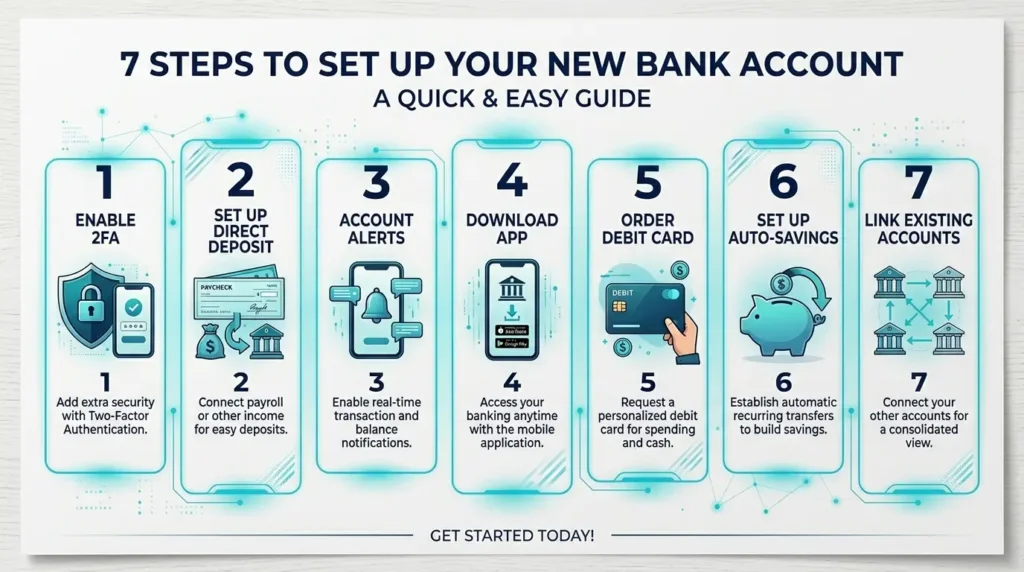
Once your account is open and funded, complete these setup steps immediately:
- Enable two-factor authentication (2FA) for security
- Set up direct deposit if applicable — provide your new routing and account number to your employer
- Set up account alerts for large transactions, low balance warnings, and login notifications
- Download the mobile app if you haven’t already
- Order your debit card if it wasn’t automatically sent
- Set up automatic savings transfers if opening a high-yield savings account alongside checking
What If Your Application Is Denied?
Bank applications can be denied for several reasons — most commonly due to a negative history in ChexSystems (a consumer reporting agency that tracks banking history, including overdrafts and unpaid fees) or identity verification issues.
If you’re denied, here are your options:
- Request your ChexSystems report (free at chexsystems.com) to see what’s on record
- Dispute any errors in your ChexSystems report
- Apply for a second-chance checking account — many banks and credit unions offer these specifically for people with negative banking history
- Try a prepaid debit card as a temporary solution while resolving ChexSystems issues
Online Bank vs Traditional Bank: Which Is Better?
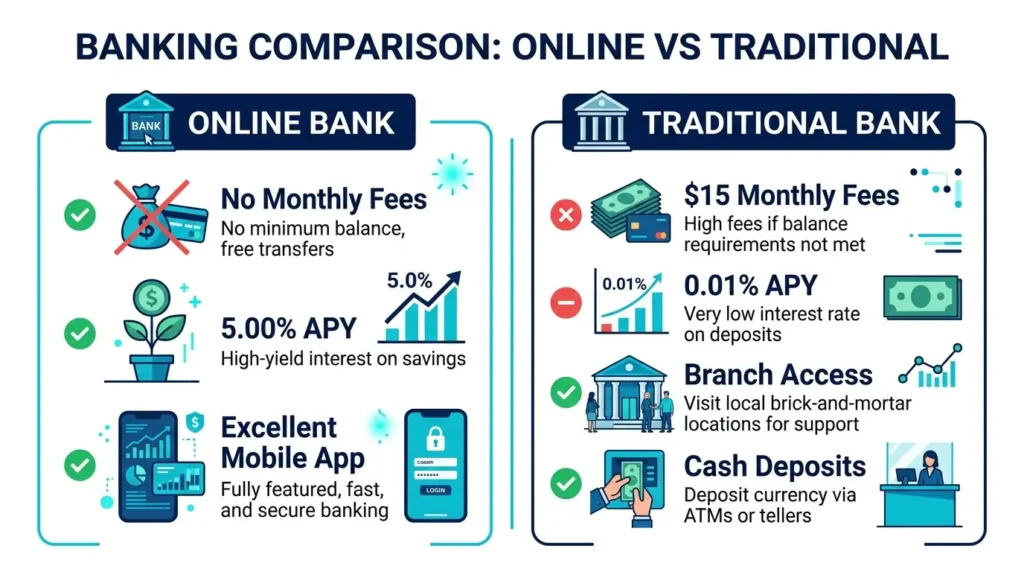
| Feature | Online Bank | Traditional Bank |
|---|---|---|
| Monthly fees | ✅ Usually $0 | ⚠️ Often $10–$15/month |
| Savings APY | ✅ 4%–5%+ (2026) | ❌ 0.01%–0.50% |
| Branch access | ❌ No physical branches | ✅ In-person service |
| ATM access | ⚠️ No proprietary ATMs (reimburse fees) | ✅ Large ATM network |
| Mobile app | ✅ Usually excellent | ⚠️ Varies widely |
| Cash deposits | ❌ Difficult or impossible | ✅ Easy at branch or ATM |
| FDIC insured | ✅ Yes (most) | ✅ Yes |
Best approach for most people: Use an online bank for your high-yield savings account (to maximize APY) and keep a traditional bank checking account for cash deposits and in-person needs if necessary. Many people successfully use online-only banking for everything.
Frequently Asked Questions About Opening a Bank Account Online
Can I open a bank account online without a Social Security Number?
Yes, with some banks. Many credit unions and community banks accept an ITIN (Individual Taxpayer Identification Number) in place of an SSN. Some banks also accept a passport and visa for non-residents. Banks like Wells Fargo and Bank of America have accounts specifically designed for immigrants without SSNs.
How long does it take to open a bank account online?
Most online bank account applications take 10 to 15 minutes to complete. Account approval is usually instant or within a few hours. Your debit card typically arrives by mail within 5 to 10 business days, but you can often use a virtual card immediately in the app for online purchases.
Is it safe to open a bank account online?
Yes, as long as you go directly to the bank’s official website or app. All legitimate banks use 256-bit SSL encryption for data transmission. Ensure the bank is FDIC-insured (look for the FDIC logo or check the FDIC bank search tool) — this protects your deposits up to $250,000.
Can I open a joint bank account online?
Yes. Most banks allow joint accounts opened online. Both account holders will need to provide their personal information and identification. Some banks require both parties to complete the application simultaneously, while others allow one person to start and invite the co-applicant later.
What is a ChexSystems report?
ChexSystems is a consumer reporting agency that tracks your banking history — specifically negative events like unpaid overdrafts, bounced checks, and account closures for cause. Most banks check ChexSystems before approving a new account. You’re entitled to one free ChexSystems report per year at chexsystems.com.
The Bottom Line
Opening a bank account online takes less than 15 minutes and can be done entirely from your phone. The key steps: gather your ID and SSN, choose a bank with no monthly fees and a competitive APY, complete the online application, verify your identity, and fund the account.
The most important decision is choosing the right bank. For most people in 2026, an online bank offers significantly better rates and lower fees than traditional brick-and-mortar institutions. Once your account is open, maximize your savings by understanding how APY works and choosing an account with the highest available yield. You can also explore checking vs savings accounts to make sure you’re using the right account type for each financial goal.
Disclaimer: This article is for informational purposes only. Bank products, rates, and terms change frequently. Always verify current offers directly with the financial institution before opening an account. FDIC insurance covers deposits up to $250,000 per depositor, per institution.